


How to create a construction schedule: 7 tips for construction teams (2026)
Learn how to create a construction schedule that enforces dependencies, links tasks to real resources, and updates as work progresses on site.

TL;DR
- A construction schedule is a living plan that links tasks, crews, dependencies, and site constraints, and updates as work progresses, not a static list of dates.
- Schedules pieced together by hand in spreadsheets break on the ground because they can't enforce dependencies or update when a task slips.
- This guide gives you 7 tips that turn the scheduling method into a working system your site actually runs on, from groundworks to handover.
- Templates and off-the-shelf schedulers make your site fit their structure. Appfarm is a platform for building a scheduling app that fits how your site sequences work, and Appfarm or a partner can build the first version with you.
Why most construction schedules break on the ground
You piece the schedule together by hand in a spreadsheet. Tasks, durations, dependencies – it all looks tidy. Then the site starts reporting progress, a crew gets delayed, a delivery slips, and the whole thing falls apart, because the spreadsheet can't enforce dependencies or update the plan. What you're left with is a document that describes a project that no longer exists.
That gap costs you. Schedules that break on the ground waste crew hours, push deliveries out of sequence, and erode trust with the project stakeholders counting on your dates – the client, the project owner, and every subcontractor working to your timeline. This guide walks through how to create a construction schedule that works in the field, not just on paper – one that enforces dependencies, links tasks to real resources, and updates as the site reports progress, so project managers can see potential delays before they cascade instead of after.
The final section covers what it takes to run a schedule like that day to day, and why a fixed template often isn't enough.
What is a construction schedule?

A construction schedule is a living plan that defines what work happens when, who does it, and how tasks depend on each other across the entire project. It sets the start and end dates for every activity, links those activities to crews, materials, and site constraints, and updates as work progresses. It is the backbone of construction project management: the artifact the whole project team plans around, from the first groundworks task to the project completion date.
That last part separates a schedule from a timeline. A project timeline is a list of dates. A construction schedule is a system: it enforces dependencies, tracks project progress, and adapts when reality changes. If the concrete pour slips two days, a real schedule pushes back the framing start that depends on it, while a timeline just shows the old dates as the site moves on without it.
Construction schedules take a few common shapes: a Gantt chart lays tasks out along a timeline and shows how they overlap and depend on each other, a network diagram maps those dependencies as a web of connected activities, and a milestone chart shows only the major markers. Gantt charts dominate construction project scheduling because they're visual, show dependencies at a glance, and are easy to update as crews report progress.
The honest limitation: most schedules live in spreadsheets or static PDFs, and those formats can't enforce dependencies or recalculate when a task slips – which is why so much construction scheduling drifts from reality within the first few weeks on site.
Why construction schedules matter (and why they break)
A working construction schedule earns its place for four reasons. It handles coordination, telling every crew and subcontractor when to show up so trades don't arrive to a site that isn't ready and everyone works from the same page. It drives resource management, linking tasks to labor, equipment, and materials so you know what's needed when – the same discipline behind good resource allocation across the entire project. It gives you risk visibility, because dependencies and float show where a delay will cascade and where you have buffer for contingency plans. And it builds stakeholder trust, because a schedule that updates honestly keeps everyone aligned on project deadlines and cuts costly surprises, which is what timely completion actually depends on.
So why do so many break? Most are pieced together in spreadsheets with no reliable way to tie tasks to crews, dependencies, and site constraints. When a task slips, the spreadsheet doesn't update the dependent tasks, so the plan quietly drifts from reality. Crews report progress in emails, texts, and paper forms, and someone translates it into updates by hand – a slow, error-prone job that happens once a week, if at all. The result is a schedule that looks tidy on paper but breaks on the ground, and once that happens a few times, teams stop trusting the plan and run the site from memory and phone calls instead.
The 7 tips below show how to create a schedule that enforces dependencies, links tasks to real resources, and updates as the site reports progress.
How to create a construction schedule: 7 proven tips

Each tip covers why it matters, how to do it, and what breaks if you skip it.
1. Start with a work breakdown structure (WBS) that matches how the site actually works
The work breakdown structure (WBS) is the skeleton of your schedule. A detailed work breakdown schedule that doesn't match how the site organizes work won't make sense to the people using it, and they'll quietly route around it.
Break the project into work packages that align with how you actually assign crews and subcontractors – by trade (groundworks, structure, mechanical, electrical, plumbing (MEP), finishes) or by project phases and zones (building A, building B). Keep each package measurable and mutually exclusive. This is the "100% rule": every package is a discrete chunk of work with a clear owner and deliverable, and together they cover the whole project with nothing double-counted. Get specific – instead of a vague "site preparation" line, break it into project activities like "clear and level site," "install temporary fencing," and "set up site office," each with its own crew, duration, and deliverable.
What breaks if you skip it: a WBS that doesn't match site reality forces crews to translate the schedule into their own language, and their updates never flow back into the plan.
2. Define dependencies and sequencing before you assign dates
Dependencies are what make a schedule a system instead of a wish list. Assign dates first and you're guessing; define dependencies first and the dates follow the logic of the work.
Go task by task and ask one question: what must finish before this can start? That's a finish-to-start dependency, the most common type in construction. There are four in total, each with its place: finish-to-start (the pour finishes before curing starts), start-to-start (framing and MEP rough-in begin together once the deck is ready), finish-to-finish (two tasks that wrap together), and start-to-finish (rare, mostly handover overlaps). Work a concrete run through it: "pour concrete foundation" must finish before "cure concrete," which must finish before "strip formwork." Then draw the sequence out, as a network diagram or a simple ordered list – A, then B, then C – so the logic is visible and checkable. Anchor your project milestones to the end of these chains rather than to arbitrary calendar dates, so a milestone moves only when the work behind it actually does.
What breaks if you skip it: dates without dependencies can't respond when a task slips, so the plan drifts the moment site reality diverges from your first guess.
A scheduling app built on Appfarm can hold these dependencies as rules, so when a crew reports a delay, the tasks that depend on it shift with it.
3. Estimate durations based on crew capacity and site constraints, not ideal conditions
A schedule built on ideal durations – "framing takes 5 days if everything goes perfectly" – breaks the first time a crew is short-staffed or a delivery runs late. Something always is.
Estimate durations against the crew you'll actually have, not the one you wish you had, and the equipment that will actually be available. Then factor in the site constraints that stretch real work beyond the textbook figure: access (can only one crew work in this zone at a time?), weather (outdoor work in winter takes longer and stops more often), and handoffs (how long does it take to get the next subcontractor on site after the previous trade clears out?). Installing HVAC ductwork might take 3 days with a full crew and clear access, but 5 if the crew is split across two sites and the space is tight. Schedule the 5. Pull the numbers from your own past projects where you can – actual durations you've recorded beat textbook rates every time, and they're what turn a hopeful figure into a realistic project timeline.
What breaks if you skip it: schedules built on ideal durations are always late, and a plan that's always late is one the team stops trusting.
4. Identify the critical path and protect it
The critical path is the longest sequence of dependent tasks in the project, the run of work with zero float. It defines the minimum project duration – the fastest the whole thing can finish if nothing slips – and it sets the finish date: if any task on it slips, the whole project slips. Protecting it is the single most important scheduling discipline you have.
Calculate it using the Critical Path Method (CPM): for each task, work out the earliest and latest start and finish dates. Tasks where earliest equals latest have no slack – they're on the critical path. If "pour foundation" then "cure concrete" then "strip formwork" then "start framing" is your longest zero-float run, every day of delay in it is a day off the handover date. On projects where durations are genuinely uncertain, the Program Evaluation and Review Technique (PERT) refines this: instead of one estimate per task, you weight an optimistic, likely, and pessimistic figure to model the overall project duration more honestly. Protect the path three ways: monitor critical tasks daily rather than weekly, put your most reliable crews on them, and build buffer into non-critical tasks so a slip there doesn't spill onto the path that matters. A Gantt chart with the critical path highlighted in red makes this visible to everyone in the trailer at a glance.
What breaks if you skip it: without a critical path you don't know which delays matter, so you burn effort firefighting non-critical tasks while the project quietly slips underneath you.
5. Link tasks to real resources so the schedule reflects what's actually available
A schedule that doesn't account for resource availability is a wish list, not a plan. Schedule two tasks that need the same crew at the same time and one won't happen, whatever the dates say.
For every task, assign three things: the crew or subcontractor responsible, the materials required and when they need to be on site, and the equipment needed and whether it's booked. "Install drywall" isn't one line – it's the drywall crew (2 workers), drywall sheets (delivered 2 days before start), and a scissor lift (booked for 3 days). Then check for conflicts: if the same crew shows up on two tasks in the same window, one has to move. This is where tidy-looking schedules quietly fall apart, because the conflicts stay invisible until two foremen are both waiting on the same lift. On repetitive work – identical floors, a run of similar units – a resource-oriented scheduling method such as line of balance (LOB) can be a better fit than a Gantt, because it plans around keeping each crew productively moving rather than around individual task bars.
What breaks if you skip it: a schedule that doesn't link to resources breaks the moment a crew is double-booked or a delivery slips.
A scheduling app built on Appfarm can connect each task to crew availability, material lead times, and equipment bookings, so conflicts show up before they reach site. It's the same logic behind resource planning and scheduling apps that catch constraints before they become clashes.
6. Update the schedule as crews report progress, not once a week in a meeting
A schedule you update once a week is a historical document, not a working plan. By Tuesday the Monday meeting is already out of date, and everyone on site knows it.
Give crews a simple way to report progress daily: a quick form on their phone, with the option of a voice note when their hands are full, that takes seconds and feeds straight into the schedule. This is exactly what a good construction daily report captures: task status (not started, in progress, complete) and actual durations as the work happens, not reconstructed from memory at the end of the week. When the concrete crew finishes the pour, they mark "pour concrete foundation" complete, and the schedule starts the clock on "cure concrete" and surfaces the upcoming tasks that just became ready to start. Clean scheduling data flowing in from the field is what keeps the plan accurate, and fast, low-friction field operations reporting is what keeps the plan and the site in sync.
Roll it out in stages. Start with one trade or one site, show foremen how the update works in a toolbox talk rather than a manual, and ask for feedback after the first couple of weeks. The software is the easy part. Getting every crew to report the same way is what makes the data usable.
What breaks if you skip it: schedules that update weekly are always out of date, and a plan that's always wrong is a plan people stop opening.
Apps built on Appfarm work across devices, can be installed on a phone, and update automatically, so crews report progress from site and the schedule updates as they do.
7. Baseline the schedule and track variance so you know when you're drifting
Without a baseline you can't measure performance. You need to answer three questions at any point: are we ahead or behind, by how much, and where?
Once the schedule is approved, save it as the baseline – the reference plan you measure everything against. As work progresses, compare actual dates to baseline dates and calculate the variance. If the baseline said "framing complete by week 8" and it finished in week 9, that's a one-week variance, and a prompt to understand why before the same cause bites the next trade. Track variance by phase, trade, or zone so you can see where delays are clustering rather than treating every slip as a one-off. Variance is also what tells you when to make schedule adjustments – rebalancing crews, resequencing, or re-forecasting the completion date – so the plan you're working to stays an accurate schedule rather than a stale one everyone has silently written off.
What breaks if you skip it: without a baseline you're flying blind. You can't measure performance, you can't defend the schedule in a client meeting, and you can't learn anything from the delays you did have.
Common construction schedule types (and when to use each)
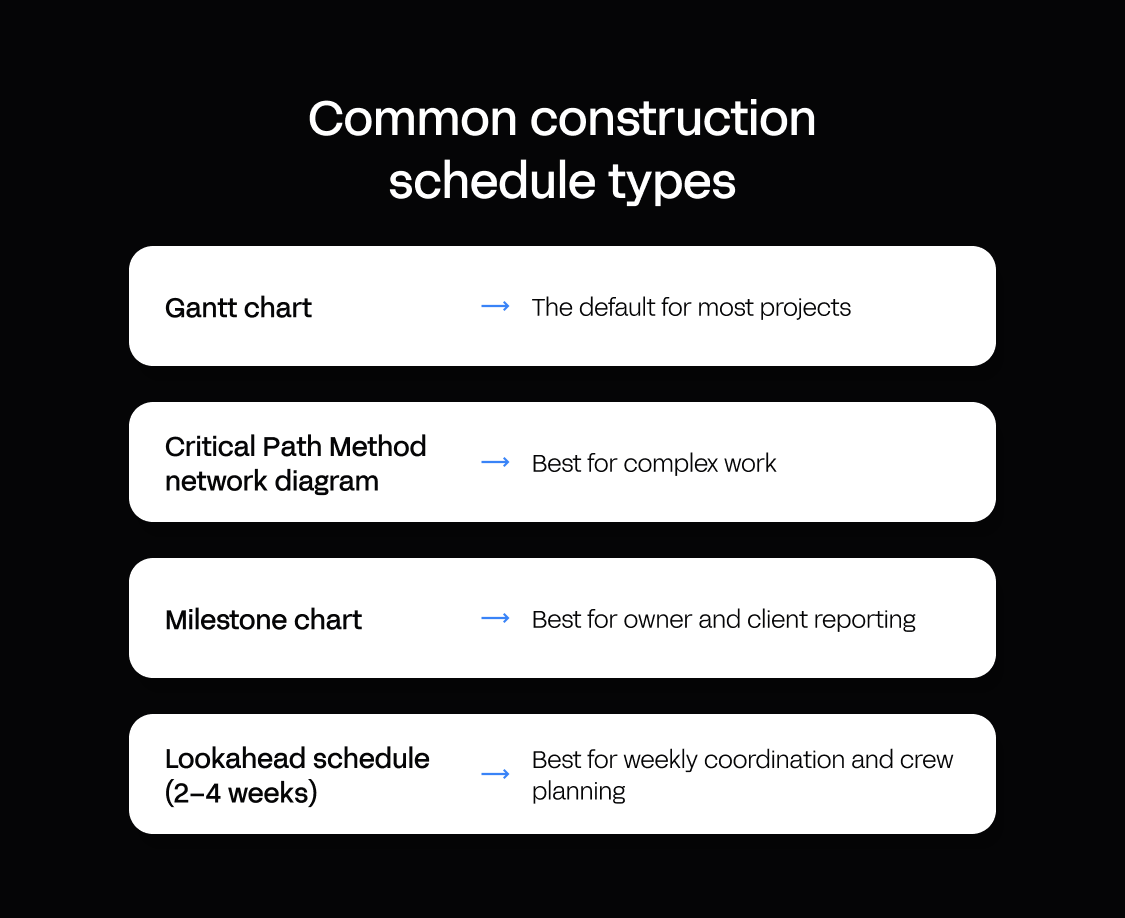
There's no single right format. Most teams run more than one at once, each doing a different job in construction project scheduling.
Gantt chart. The default for most projects: tasks, durations, dependencies, and progress on a timeline. Best for clear sequencing and moderate complexity – most commercial and residential builds. It gets cluttered on very large projects.
Critical Path Method (CPM) network diagram. Shows dependencies as a network of nodes and arrows and makes the critical path explicit. Best for complex work where that path is essential – infrastructure and large commercial. Harder to read than a Gantt, so teams usually pair the two.
Milestone chart. Shows only major deliverables and deadlines – "foundation complete," "weathertight," "handover." Best for owner and client reporting. It hides the work between milestones, so it's a reporting tool, not a planning one.
Lookahead schedule (2–4 weeks). A short-term, detailed view of the next few weeks. Best for weekly coordination and crew planning, where the whole-project view is too coarse. It has to roll forward every week to stay relevant.
A simple decision framework: use a Gantt chart for most projects, add a CPM network when the critical path is genuinely complex, produce a milestone chart for client reporting, and maintain a rolling lookahead for weekly coordination. The formats aren't rivals – they're different lenses on the same construction project schedule.
A construction schedule template is a reasonable place to start, and a free construction schedule template can save you an afternoon of setup on a simple build. But a template is a starting shape, not a system. The moment the schedule has to enforce dependencies, resolve resource conflicts, and update itself from the field, a static template hits the same ceiling as the spreadsheet it came from. That's the gap between a template and the construction scheduling tools – or the purpose-built construction project management software – that a good construction schedule eventually needs.
How Appfarm helps you build a construction schedule that fits your site
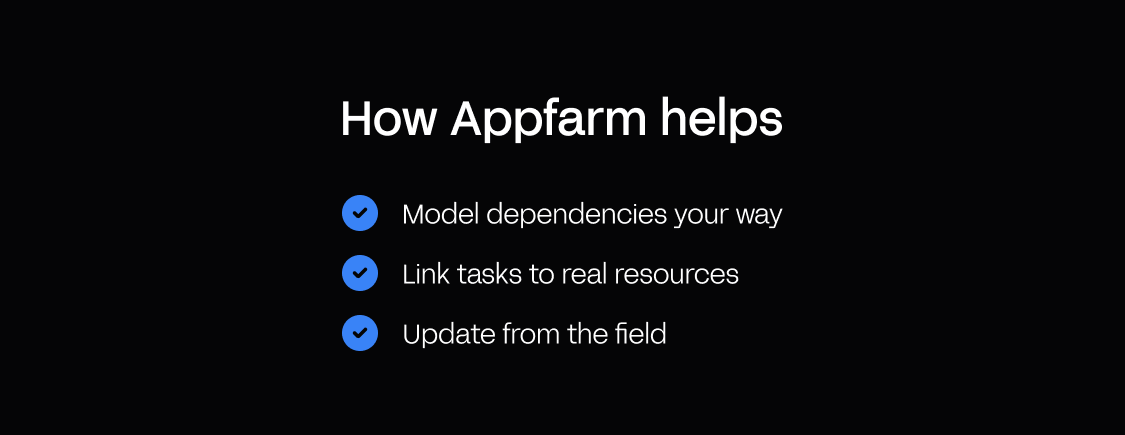
A template or an off-the-shelf scheduler gives you someone else's idea of how a project runs. The tips above only work if the schedule follows how your site actually sequences work, links to your real crews and equipment, and updates from the field.
Appfarm is a platform for building custom operational software, and a scheduling app is a common one for construction teams. You decide what the app does: the work packages, the dependency rules, which crews and equipment each task needs, and what the site reports back. Appfarm runs everything underneath it: deployment, hosting, security, performance, and availability, hosted in the EU/EEA with ISO 27001 certification and GDPR compliance.
You don't have to build it yourself. Most teams start by working with Appfarm or an implementation partner to scope and build the first version, then take the build in-house later if they want to. Other teams start building directly.
A scheduling app doesn't have to be the only thing you get out of it. Daily reports, site inspections, or equipment booking can run on the same foundation and share the same crew and task data, instead of becoming three more subscriptions.
Because you build the app instead of adopting a scheduler's template, it fits how your sites run rather than forcing your planners around fixed fields. Describe what you need and Appfarm generates a working app, which you then adjust on the visual canvas or by prompting again: the dependency between the pour and stripping formwork, who gets notified when a critical task slips, what the foreman's daily update asks for. When the way you plan changes, the change can be live for crews the next day.
In practice, that looks like this:
- Dependencies that follow your sequencing. Tasks, dependencies, and resources are connected data, so when a crew reports a delay, the tasks that depend on it move with it, following the rules you set rather than a generic template.
- Tasks linked to real resources. Connect the schedule to crew availability, material lead times, and equipment bookings. Appfarm supports full API integrations, so the schedule can share data with the enterprise resource planning (ERP), finance, and site systems you already run.
- Updates from the field. Crews report progress from their phones, and the schedule updates as they do.
Construction teams already plan this way. POB Entreprenør, a Norwegian contractor running up to 300 projects at once, replaced whiteboards and Excel with a custom resource planning app that allocates people and machines in real time, with a dedicated field app for crews. It had a usable version in less than two weeks. At Implenia, Appfarm built a resource planning system that coordinates project staff across projects, departments, and locations, replacing spreadsheet tracking and long email chains.
See how construction teams build planning and scheduling apps on Appfarm.
Conclusion: a construction schedule that stays honest
Most construction schedules break for the same reason: the plan can't follow what happens on site. The 7 tips above are the fix: build a WBS that matches how the site works, define dependencies before dates, estimate durations against real crews and constraints, protect the critical path, link tasks to real resources, update as crews report progress, and baseline the schedule so you know when you're drifting.
Method is only half the job. The other half is a system that enforces it as the site moves, built around how your projects actually run rather than a fixed template. Appfarm is a platform for building that kind of scheduling app, and Appfarm or a partner can build the first version with you.
See how construction teams build planning and scheduling apps on Appfarm.
FAQs
What is a typical construction schedule?
A typical construction schedule is a Gantt chart that shows tasks, durations, dependencies, and progress on a timeline. It links activities to crews, materials, and site constraints, and updates as work progresses. Most schedules are organized by phase – site prep, structure, MEP, finishes – or by trade.
What is a construction schedule called?
A construction schedule is also called a project schedule, master schedule, or baseline schedule. Specific types include Gantt charts (the most common), Critical Path Method (CPM) network diagrams, milestone charts, and lookahead schedules – short-term, detailed plans for the next 2–4 weeks.
How to do a construction schedule?
To create a construction schedule: (1) break the project into a work breakdown structure (WBS), (2) define dependencies and sequencing, (3) estimate durations based on crew capacity and site constraints, (4) identify the critical path, (5) link tasks to real resources, (6) update as crews report progress, and (7) baseline the schedule and track variance.
What are three common types of construction schedules?
The three most common construction schedule types are the Gantt chart (tasks, durations, and dependencies on a timeline), the Critical Path Method (CPM) network diagram (dependencies as a network, identifying the critical path), and the milestone chart (major deliverables and deadlines for stakeholder reporting).
More reading
There are no items matching your filters. Please try another filter to view results.
We have a lot of helpful resources. Try another filter or reset the filters to find the resource for you.
Digital transformation without disruption

