


How to manage construction site inventory: 8 proven tips for construction teams (2026)
Master construction site inventory with mobile tracking, reorder triggers, and location control. Stop stockouts, shrink, and over-ordering with proven tips.

TL;DR
- Most construction site inventory is managed from memory and spreadsheets. Materials run out mid-task, get over-ordered, or walk off site unrecorded, bleeding margin.
- Learning how to manage construction site inventory means mobile stock counts, reorder triggers, and location tracking tied to procurement.
- The 8 tips below move from process to people to field technology, giving you a full operating model.
- Appfarm builds site inventory apps as installable PWAs (progressive web apps installed to a phone home screen). Your team owns what the app does; Appfarm keeps it running.
How to manage construction site inventory (and why memory fails)
On most sites, the store is run from memory, a clipboard, and a spreadsheet someone updates when they remember. That is as true of small construction companies running two crews as it is of commercial contractors managing multiple job sites. It is also why learning how to manage construction site inventory matters. Materials run out at the wrong moment, get over-ordered to compensate, or disappear until the month-end reconciliation shows the loss. This is where teams start asking how to improve inventory management processes in construction tech.
The cost is operational and financial. Crews sit idle waiting on a store run, and a half-day of idle labor turns into project delays that ripple through the schedule. Capital gets locked in excess inventory. Variation claims go undocumented, and there is no audit trail when a client or quantity surveyor (QS) asks for proof of consumption.
Managed well, site inventory control links mobile stock counts, reorder triggers, and location data to procurement. The right construction materials are on site when needed, shrink is visible in real time, and the back office has the data to cost jobs accurately and defend variations. Effective inventory management is what lets teams maintain project schedules instead of rebuilding them around whatever failed to arrive. The 8 tips below give you that operating model, from process to people to technology.
What construction site inventory management actually is
Construction inventory management is the process of ordering, receiving, storing, issuing, tracking, and reconciling materials, tools, and equipment across active sites, often with mobile crews and no fixed warehouse.
It splits into three categories, using the framing set out in Procore's construction inventory guide:
- Consumables (fasteners, adhesives, PPE, fuel): high-volume, low-value items that disappear fast and are rarely tracked per unit.
- Building materials (timber, steel, concrete, fittings): ordered against BOMs (bills of materials), delivered in bulk, and issued to specific work packages or cost codes.
- Tools and equipment (power tools, site equipment, hired plant): high-value, mobile, and theft-prone, so they need sign-out, asset tracking, and location data.
Warehouse inventory management software assumes one controlled building with fixed racking and gated access. A construction project does not work that way. Materials move between the laydown yard, site stores, trucks, and active work areas, so there is no single fixed location to count. Access is open, with transient subcontractors coming and going. Demand shifts with design changes, variations, and weather delays. Accountability is split, because procurement orders, the site receives, crews consume, and the back office reconciles and costs.
That is why construction inventory management systems have to handle both materials and equipment, across multiple sites, in the hands of people wearing gloves. Without a system that works in the field, construction inventory tracking defaults to memory, manual tracking, over-ordering, and month-end surprises.
The 5 core challenges of construction site inventory
Before the tips, it helps to name why site inventory control breaks. These five challenges share one root cause, and spreadsheets solve none of them.
1. Tracking materials across multiple locations
Materials arrive at the main gate, move to the laydown yard, transfer to site stores or straight to work areas, and get consumed by crews, often with no record until someone notices the pile is gone. Run several projects at once and the problem compounds: stock sitting idle on one job is the same stock being urgently ordered for another. A spreadsheet cannot track inventory movement in real time, so inventory levels are always a guess.
2. Accountability and waste
When materials are issued without a sign-out, no one knows whether stock went into the job, onto another project, or off site entirely. Waste and shrink stay invisible until the month-end reconciliation shows the loss, and by then the trail is cold.
3. Theft and shrink
Sites are open, with transient subcontractors and limited access control. High-value targets like copper, power tools, and fuel move easily, and without real-time tracking and location data, theft surfaces too late to recover or claim.
4. Long lead times and supply variability
When supply chains tighten, lead times get longer and less predictable. Ordering on memory or rough historical usage leaves you either short, with idle crews and costly delays, or over-stocked, with capital locked up and obsolescence risk building in the yard. Critical components with 12-week lead times are the ones that stop a job, and they are exactly the ones accurate forecasting protects.
5. Variations and changing demand
Design changes and client variations are constant. If your inventory system is a spreadsheet, you cannot quickly model the material impact, adjust orders, or capture the variation with evidence at the point it happens. Weak documentation means weak claims and margin leakage.
The common thread: inventory lives in memory and spreadsheets, not in a system that works where the work happens. The 8 tips below fix that.
The 8 proven tips to manage construction site inventory
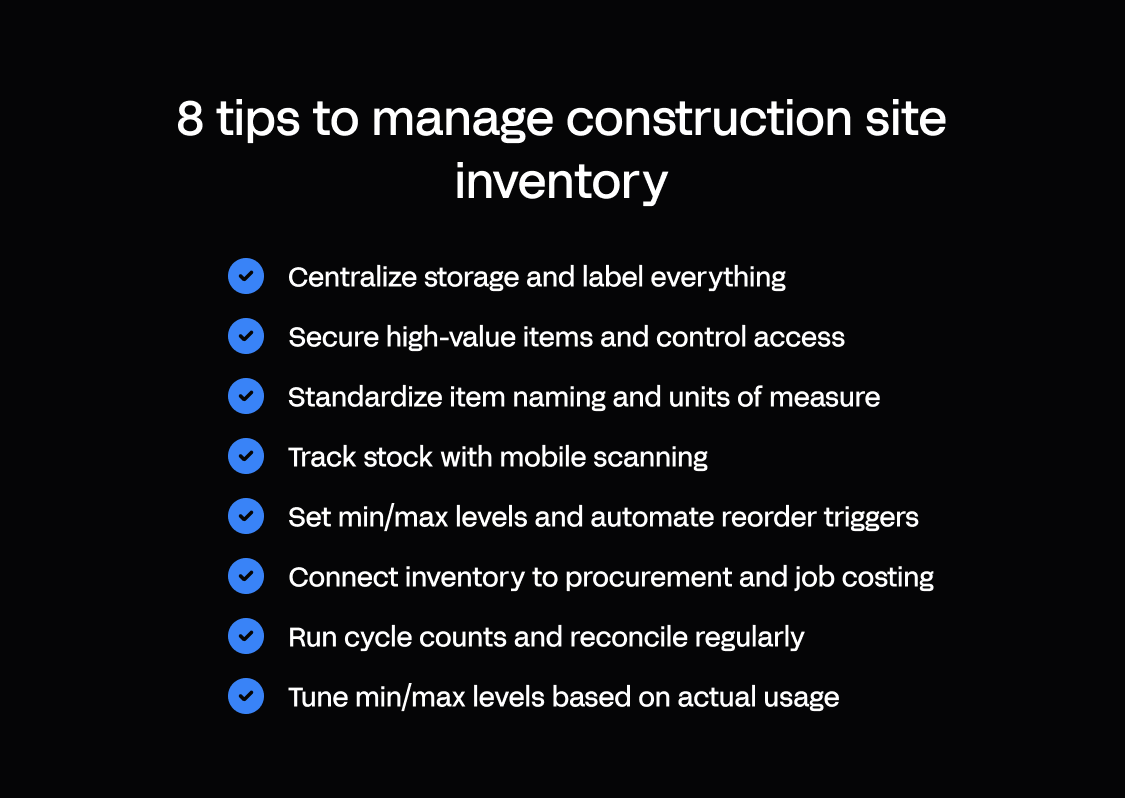
Tips 1 to 3 cover process. Tip 4 covers people, the layer most competitor guides skip. Tips 5 to 8 cover the controls and field technology that tie the operating model together.
Tip 1: Centralize storage and standardize location codes
What it is: Designate one controlled site store (or a small, clearly defined set of stores per site) and give every storage location a code, such as Store-A-Rack-03, Laydown-Zone-B, or Van-12. Label the physical locations and use the same codes in your tracking system.
Why it matters: Centralized, proper storage cuts search time, tightens security with fewer access points, and makes stock counts faster and more accurate. Location coding is the foundation of multi-location tracking: it lets you follow movement from laydown to store to work area, across multiple projects, and answer “where is it?” in seconds.
How to implement:
- Map every storage point, including the main store, laydown yard, subcontractor compounds, tool cribs, and vehicles.
- Assign a simple, hierarchical code to each location, avoiding schemes too complex for field crews to use.
- Label physical locations with weatherproof signage.
- Record location codes in your system so every receipt, transfer, and issue captures where stock came from and where it went.
Construction-specific watch-out: Sites change. Laydown areas move, new compounds open, and vehicles rotate. Build a process to update codes and tell crews, or the system drifts out of sync with reality.
Appfarm angle: Appfarm inventory apps let you define location hierarchies visually and update them as sites evolve, so mobile counts reflect the current layout. For large sites, you can use a map to locate storage points and materials.
Tip 2: Secure inventory with role-based access and sign-out
What it is: Control physical access to storage (locked stores, fenced yards, signed-out tools) and run a sign-out and sign-in process for high-value items, backed by role-based permissions in your tracking system.
Why it matters: Physical and system security reduces theft and shrink. Sign-out accountability tells you who has what, where it is, and when it is due back, which is the difference between asset management and hoping. Role-based access stops unauthorized transfers and keeps stock adjustments in trained hands, so the audit trail stays reliable.
How to implement:
- Store high-value materials and tools in lockable containers or cabins, fence and gate laydown yards, and add CCTV where theft risk is high.
- Require crews to sign out tools and high-value consumables with a name, date, and expected return, using a mobile form rather than a paper log that gets lost.
- Define who can receive, issue, transfer, adjust, and approve, then enforce those permissions in the system.
Construction-specific watch-out: Subcontractors and temporary labor complicate access control. Add a subcontractor sign-out process and a clear policy on who is liable for losses.
Appfarm angle: Appfarm apps enforce role-based permissions and mobile sign-out, so only authorized users issue or transfer stock and every transaction has an audit trail.
| Process step | Responsible | Accountable | Consulted | Informed |
|---|---|---|---|---|
| Receive delivery | Store/warehouse | Site manager | Procurement | Accounting |
| Issue to crew | Foreman | Site manager | Store/warehouse | Project manager |
| Transfer between sites | Store/warehouse | Site manager | Project manager | Procurement |
| Cycle count | Store/warehouse | Site manager | Foreman | Accounting |
| Adjust stock | Site manager | Project manager | Store/warehouse | Accounting |
| Approve orders | Procurement | Project manager | Site manager | Accounting |
Tip 3: Run regular cycle counts, not just year-end stocktakes
What it is: Count a subset of inventory every week or month (cycle counting) instead of waiting for a full year-end stocktake. Reconcile physical counts against system records, investigate variances, and adjust promptly.
Why it matters: Cycle counting catches errors and shrink early, while you can still investigate. It keeps the system accurate so reorder triggers work, and it spreads the workload so no stocktake shuts the site for a day. Regular reconciliation also strengthens your audit trail for QS reviews and variation claims.
How to implement:
- Prioritize high-value and high-turnover items using ABC analysis.
- Assign cycle-count responsibility to a named owner and schedule counts on a calendar.
- Record counts on a mobile device in the field, not on paper that gets transcribed later, which is where most manual entry errors are introduced.
- Investigate any variance above a set threshold, such as 5% or £500, and document the cause before adjusting.
| Class | Item examples | Count frequency | Typical owner |
|---|---|---|---|
| A (high value) | Power tools, copper, surveying kit | Weekly | Store/warehouse |
| B (medium value) | Fittings, fixings in bulk | Monthly | Store/warehouse |
| C (low value) | Fasteners, PPE, adhesives | Quarterly | Foreman |
Construction-specific watch-out: Weather, access, and schedules disrupt planned counts. Build flexibility in and tell crews the schedule so they do not move materials mid-count.
Appfarm angle: Appfarm inventory apps support mobile cycle counting on site and route variances into investigation workflows. Field connectivity behavior is covered on the platform overview.
Tip 4: Define clear roles and train every team
What it is: Assign ownership for each process step (who orders, receives, issues, counts, reconciles, and approves) and train field crews, store staff, and the back office on their responsibilities and the system.
Why it matters: Inventory fails when accountability is unclear (“I thought someone else was ordering that”) or when crews bypass a system they find slow or confusing. Clear roles turn a set of habits into a structured process, and training turns inventory from an admin burden into a shared operating discipline that supports resource allocation across the construction business.
How to implement:
- Document who’s involved by using a RACI (Responsible, Accountable, Consulted, Informed) model for each process step, so every task has one clear owner and no one assumes someone else has it covered. Take issuing materials to a crew: the foreman is Responsible for making the issue and recording it, the site manager is Accountable for the outcome and signs off on it, the store is Consulted on what's actually in stock before it goes out, and procurement is Informed the moment that issue takes stock below the reorder point. Do the same for receiving, transfers, counts, and adjustments, and you have the matrix shown in Tip 2.
- Train crews on the mobile workflow: how to request, record consumption, and return unused materials.
- Train store staff on receiving (check against the PO (purchase order), record location, flag shortages), issuing, and counting.
- Train the back office on how inventory data feeds purchasing, job costing, and variation claims.
Construction-specific watch-out: High turnover and transient subcontractors make training ongoing, not one-and-done. Build a short, mobile-first induction and a refresher process.
Appfarm angle: Appfarm apps are built for field adoption, with simple mobile interfaces crews learn in minutes and role-based views so each user sees only what they need.
Tip 5: Set min/max levels and automate reorder triggers
What it is: Set minimum and maximum stock levels for each item or category based on lead time, inventory usage rate, and a buffer for variability. Then automate reorder triggers so procurement is notified, or a draft order is generated, when stock falls below the minimum.
Why it matters: Min/max levels prevent both stockouts and excess inventory. Automated alerts remove the “someone has to remember” dependency and let procurement focus on exceptions like long lead times and supplier issues rather than routine replenishment. Done well, this is what turns managing materials into ensuring timely delivery of the right items to the right job.
How to implement:
- Calculate the minimum as (average daily usage × lead time in days) plus safety stock, then set the maximum at the minimum plus a practical batch size.
- Start with broad categories if item-level data is sparse, then refine as usage history builds and accurate forecasting becomes possible.
- Automate the trigger so a sub-minimum level notifies procurement or drafts a PO when pricing is pre-agreed.
- Review and tune min/max quarterly, or after major scope changes, against actual consumption.
Construction-specific watch-out: Variations can spike demand for specific materials. Build a process to expedite orders when the forecast changes, and tell procurement about scope changes early.
Appfarm angle: Appfarm inventory apps calculate reorder triggers from your min/max rules and send mobile alerts to procurement, with one-tap approval that raises a PO directly in your procurement or ERP system and tracks the order through to delivery in the same app — or generates a supplier email where a full integration isn't in place.
Tip 6: Track in the field with mobile apps and scanning
What it is: Replace paper logs and spreadsheet updates with a mobile inventory app that crews, store staff, and site managers use to receive, issue, transfer, count, and request materials in real time, with barcode scanning or QR codes to cut manual entry.
Why it matters: Tracking only works where the work happens, and crews will not use a desktop system or a paper log someone else transcribes later. Mobile apps with scanning make tracking fast and accurate, and part of the daily workflow rather than an afterthought. The payoff is real-time visibility of what is on site, what is running out, and what has moved.
How to implement:
- Choose a mobile-first system that handles patchy connectivity gracefully, and verify its exact offline behavior before you depend on it.
- Label inventory with barcodes or QR codes, printing durable labels for stock that arrives unlabeled.
- Train crews to scan on receipt, on issue, on transfer, and during counts.
- Capture photos and notes as evidence, such as damage on receipt or the condition of returned tools.
Technology trade-offs: Match the method to volume, value, and crew capability. The table below compares the common options.
| Method | Cost | Accuracy | Setup effort | Best fit |
|---|---|---|---|---|
| Manual entry | Low | Low | Low | Low-volume, high-value items |
| Barcode | Low | High | Medium | Most site materials and consumables |
| QR code | Low | High | Medium | Locations, kits, mixed items |
| RFID (radio-frequency identification) | High | High | High | High-value tools that move often |
| IoT (internet of things) sensors | High | High | High | Environmental monitoring of sensitive stock |
Appfarm angle: Appfarm builds mobile inventory apps with barcode and QR scanning plus photo capture. Crews record stock as they work, and the data flows to procurement and job costing. Start with a prompt, refine on the visual canvas, and deploy a governed app your team controls. See what these apps look like in practice on the customer examples page and the field operations use case.
Tip 7: Integrate inventory with procurement and job costing
What it is: Connect your inventory system to procurement (so POs flow in and trigger receipts), job costing (so issued materials hit the right cost code and work package), and ERP (enterprise resource planning) or accounting (so stock valuations, invoices, and reporting stay accurate in real time).
Why it matters: Inventory data in isolation is just a stock list. Integrated data drives procurement efficiency through three-way matching of PO, receipt, and invoice, charges materials to the right project and phase, and gives finance real-time stock valuation and an audit trail for QS and client reviews. Cost tracking at item level is also what makes financial reporting reflect the job rather than the invoice date.
How to implement:
- Map the data flows: receipts update stock and match invoices, issues update job cost actuals, and adjustments flow to costing and accounting.
- Use APIs or scheduled syncs to connect systems, avoiding manual exports that introduce errors and delays.
- Standardize item masters and cost codes across procurement, inventory, costing, and ERP so data moves cleanly.
Construction-specific watch-out: Many firms run separate systems with manual reconciliation between them. Accounting integration is the unlock, but it needs data governance around item masters, units, and cost codes, and often a platform that can connect several systems. UK contractors have a second reason to keep material records clean: under the Construction Industry Scheme (CIS), deductions apply to the labor element of a subcontractor payment and not to materials, so a defensible material-versus-labor split depends on accurate financial tracking at the point of issue.
Appfarm angle: Appfarm supports full API integrations across your ERP, procurement, project management, and finance systems, so the inventory app feeds the back office in real time without manual exports. See the integrations page for the connection options.
Tip 8: Track KPIs and improve continuously
What it is: Define and monitor key performance indicators for inventory performance, such as accuracy, stockouts, shrink, carrying cost, turnover, and service level, then use the data to fix process breakdowns, tune min/max, and justify technology investment.
Why it matters: What gets measured gets managed. KPIs turn inventory practices from a cost center into a process you can improve, and they build the business case for technology and the evidence for variation claims. When you can show that better inventory data helped you cut stockouts and reduce costs on the last two jobs, the investment case makes itself.
How to implement:
- Track a small, core set of KPIs from the start.
- Dashboard them weekly or monthly, not just at project close, so you can intervene early.
- Run quarterly reviews to find the cause of stockouts, shrink, and slow steps.
- Act on the data: adjust min/max, change suppliers, retrain crews, or add scanning where manual entry causes errors.
| KPI | How to calculate | Target |
|---|---|---|
| Inventory accuracy | Correct counts / total counts × 100 | Above 95% |
| Stockout rate | Stockout incidents / total requests | Below 2% |
| Shrink rate | (Book stock − physical stock) / book stock × 100 | Below 3% |
| Inventory turnover | Cost of materials used / average inventory value | Higher, benchmarked per project |
| Service level | Requests fulfilled on time / total requests | Above 98% |
| Lead-time variance | Actual lead time − planned lead time | Near zero |
Construction-specific watch-out: KPIs only drive improvement if someone owns them and can act. Name a site-level owner (site manager or senior foreman) and a project-level owner (project controls or operations).
Appfarm angle: Appfarm inventory apps include built-in dashboards and reporting, so KPIs stay visible in real time and you can drill into which site, item, or crew is driving a number.
What to look for in construction inventory management software
The 8 tips describe the operating model. Most construction companies then go looking for construction inventory management software to run it, and the market ranges from bolt-on modules inside project management suites to standalone construction inventory software to configurable platforms you shape around your own processes.
Whatever route you take, the same short list of inventory features decides whether crews adopt it or work around it.
| Capability | What to check | Why it matters on site |
|---|---|---|
| Mobile-first field use | Works on a phone, in gloves, on patchy signal | If it needs a desk, it will not be used |
| Barcode scanning and QR codes | Scan on receipt, issue, transfer, and count | Removes manual entry errors at source |
| Item photos and images | Attach a picture to each item and location | Crews find stock by sight, faster than reading a part number or barcode |
| Multi-location tracking | Stores, laydown, vans, multiple sites | One stock picture across multiple job sites |
| Equipment tracking and sign-out | Asset register, custody, return dates | Tools are the theft-prone half of inventory |
| Automated alerts | Min/max breaches, overdue returns, expiring hires | Replenishment stops depending on memory |
| Real-time visibility | Live dashboards and visual inventory management views | Decisions get made on data, not a phone call |
| Accounting integration | ERP, procurement, and job-costing APIs | Cost tracking and financial reporting stay accurate |
| Budgeting tools and cost codes | Item-level costs mapped to work packages | You see margin while you can still protect it |
| Reporting and audit trail | Exportable history of every transaction | Evidence for QS reviews and variation claims |
Two things worth weighing before you buy. First, fit: technology solutions built for distribution warehouses assume a fixed building and stable demand, and they struggle with a construction project that moves weekly. Second, flexibility: the way you manage inventory is specific to how your business runs, and rigid software forces you to change your process to match the tool. A well managed inventory process mirrors your sequencing, your cost codes, and your crews, not a vendor's template. Small construction companies often start with a single-site pilot covering high-value stock only, then extend across multiple sites once crews trust the data.
How Appfarm helps construction teams manage site inventory
You have just read 8 tips across process, people, and technology. The process and people parts you can start tomorrow. The technology part, meaning mobile apps, scanning, and real-time integration with procurement and job costing, is where most construction teams get stuck. Off-the-shelf construction software is rigid and expensive. Spreadsheets do not work in the field. Custom development is slow and needs a dev team you do not have.
Appfarm is an AI-powered visual development platform that lets operations and IT build custom site inventory apps together, covering mobile counts, reorder triggers, location tracking, scanning, and procurement integration, without managing infrastructure or writing code. It is a single platform where teams move fluidly between building with a prompt and refining on the visual canvas, which is Appfarm's heritage. Appfarm builds installable PWAs, not native app-store apps.
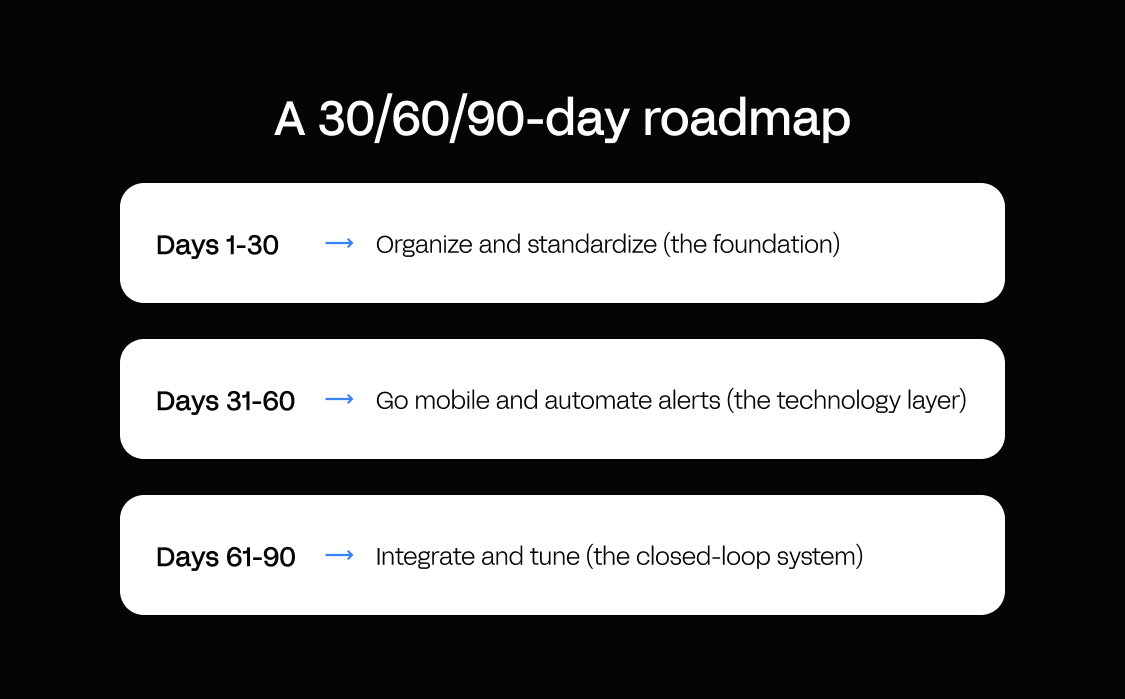
Here is how the platform works for a construction inventory app:
- Start with a prompt. Describe the app you need, such as “a site inventory app with mobile stock counts, location tracking, and reorder triggers linked to procurement,” and have Appfarm AI generate a working app.
- Refine on the visual canvas. Adjust the mobile UI, add scanning, configure min/max and reorder workflows, connect your ERP or procurement system by API, and set role-based permissions. You can move between AI and the canvas at any point.
- Deploy to production with governance. Ship a scalable app with role-based access, SSO (single sign-on), and audit trails. Appfarm reviews, secures, patches, hosts, and keeps the app online on EU/EEA-hosted, ISO 27001-certified, GDPR-compliant infrastructure, so uptime, patching, and disaster recovery are handled for you.
The ownership frame matters most: your team owns what the app does, and Appfarm owns keeping it running. That is the difference between Appfarm and the raw-code route, including vibe-coded tools. A generated codebase you now depend on but did not write becomes a maintenance burden with no production governance layer, so review, security patching, and uptime all fall on you.
No app is truly finished at delivery. Nothing beats putting it in front of real crews on site, where day-to-day use surfaces the UX issues to refine, and the managed platform is where those changes ship and keep running.
For proof, look at the documented Skanska story: the Godig team moved off Power Apps and built with Appfarm, and the work went on to win an innovation award. Read the Godig / Skanska case study. For a materials-and-logistics example, Ahlsell built Ahlsell Flow on Appfarm — a suite of construction-logistics apps that replaced phone-and-email coordination with a visual, image-based interface site managers picked up in minutes. See the Ahlsell case study, or browse more construction proof on the customer stories hub.
One honest trade-off: Appfarm is built for business-critical operational apps like site inventory that need governance, integration, and scale. It is not aimed at personal projects or single-user productivity apps.
Get started for free, or explore the inventory management use case first.
What good construction site inventory management looks like in 2026
Good construction site inventory management in 2026:
- Lives in the field, on mobile apps with barcode scanning or QR codes, where the work happens.
- Connects people and process (clear roles, cycle counting, min/max rules, training) with real-time tracking and integration.
- Balances control and speed, secure enough for accountability yet fast enough that crews use it instead of working around it.
- Provides visibility and audit trails, with KPIs, dashboards, and evidence for variation claims.
- Evolves with the business, with adjustable rules and updatable location codes across sites.
What to avoid:
- Spreadsheets and memory, which do not scale, do not work in the field, and leave no audit trail.
- Desktop-only systems that field crews will not use.
- Over-engineered solutions, such as RFID and IoT for everything when scanning is faster and cheaper for most stock.
- Technology without process, because an app will not fix unclear roles or missing cycle-count discipline.
The 8 tips give you the operating model. Mobile, integrated, governed technology makes it sustainable. Get both right and the gains compound across the construction industry's usual pain points: fewer project delays, better operational efficiency, tighter margins, and the kind of reliable handover dates that drive customer satisfaction.
Conclusion: from spreadsheets to mobile inventory apps crews own
Construction site inventory run from memory and spreadsheets bleeds margin through stockouts, over-ordering, and shrink. The 8 tips above (centralize, secure, count, define roles, tune min/max, go mobile, integrate, and track KPIs) give you the operating model to fix it. The technology unlock is a mobile inventory app that works where the work happens, connects to procurement and job costing, and stays maintained as your sites and processes change.
This is exactly what Appfarm is built for: site inventory apps with mobile stock counts, reorder triggers, and location tracking, replacing spreadsheets with governed, scalable apps that field crews and the back office own together. Appfarm keeps them running, so you get custom software without having to become a software company.
Construction site inventory management FAQ
What is the 80/20 rule in inventory?
The 80/20 rule, or Pareto principle, means roughly 80% of your inventory value comes from about 20% of your items. In construction, focus cycle counting, security, and min/max tuning on that high-value 20% for the biggest impact on cost control and stockout prevention.
What are the 5 P's in construction?
The 5 P's in construction are Prior Planning Prevents Poor Performance, a reminder that planning prevents costly mistakes. For site inventory, prior planning means setting min/max levels, scheduling cycle counts, and training crews before materials arrive, not after a stockout hits.
What are the 5 steps of inventory management?
The 5 steps of construction inventory management are planning (forecast needs and set min/max levels), procurement (order with lead-time buffers), receiving (verify deliveries and record location), issuing and tracking (record consumption and transfers), and reconciliation (cycle count, investigate variances, and adjust).
How do you track inventory across multiple job sites?
Give every location a code (store, laydown zone, van, work area), record every receipt, issue, and transfer against that code from a mobile device, and use barcode or QR scanning so the record is created at the moment stock moves. That gives you one live stock picture across multiple job sites, shows project progress against material consumption, and makes transfers between sites visible instead of inferred after the fact.
More reading
There are no items matching your filters. Please try another filter to view results.
We have a lot of helpful resources. Try another filter or reset the filters to find the resource for you.
Digital transformation without disruption

